
Download PhonerLite – VoIP, Windows, SIP, phone, communication, internet telephony, PC calling
Overview
PhonerLite is a lightweight VoIP application designed for Windows users seeking a straightforward solution for internet telephony. The app enables users to make and receive calls using their PC, leveraging SIP-compatible providers for connectivity. It is tailored for individuals who prefer managing their communications through desktop systems rather than mobile devices. The application addresses the need for a simple, efficient tool to handle voice calls over the internet without requiring complex configurations.
Target users include remote workers, small business owners, and tech-savvy individuals who rely on VoIP services for daily communication. The app is especially useful for those managing multiple accounts across different providers, as it supports the configuration of multiple SIP profiles. Real-world use cases include virtual office setups, customer support operations, and personal communication over stable broadband connections.
Although the developer did not provide additional background details, PhonerLite has been available since 2013, indicating a long-standing presence in the communications software space. Its continued relevance suggests a focus on reliability and minimalism. In the broader app ecosystem, PhonerLite fills a niche for lightweight, no-frills VoIP clients that prioritize functionality over advanced features.
Key Features & Functionality
- User-Friendly Interface: PhonerLite features a clean, well-organized layout that simplifies navigation for users of all skill levels. The interface emphasizes clarity and direct access to core functions, reducing the learning curve for new users while remaining efficient for experienced ones.
- Multiple SIP Profiles: Users can configure and manage several SIP accounts within a single application. This allows seamless switching between different providers or services, ideal for users who operate across multiple VoIP platforms.
- Integrated Phone Book: The built-in contact manager enables users to store, edit, and search for contacts easily. This feature ensures quick access to frequently called numbers, improving call efficiency and reducing dialing errors.
- Call Logs: PhonerLite maintains a detailed history of incoming and outgoing calls. Users can review past interactions, identify missed calls, and quickly redial frequently contacted numbers, enhancing communication tracking and productivity.
For example, a remote employee using different SIP services for work and personal calls can switch between profiles without launching separate applications. Similarly, a small business owner managing multiple lines can use the phone book to store client information and refer to call logs for follow-ups.
Interface, UX & Performance
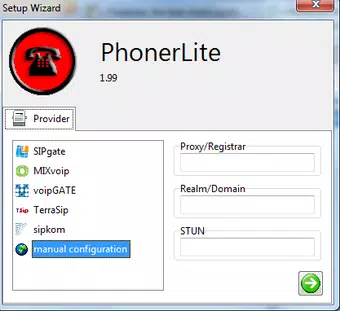
PhonerLite presents a minimalistic interface that prioritizes usability over visual flair. The layout is structured around essential call controls, contact access, and account settings, allowing users to perform core tasks with minimal clicks. Navigation is linear and intuitive, with clearly labeled buttons and organized sections.
Visual design is functional rather than decorative, focusing on readability and ease of interaction. The application uses standard Windows UI elements, ensuring consistency with the operating system’s look and feel. This contributes to a familiar experience for users accustomed to desktop software.
Although the developer did not list formal performance metrics, the app’s file size of 1.2 MB suggests a lightweight footprint, which typically correlates with low resource usage. It is expected to run smoothly on systems with basic hardware, especially those meeting the minimum requirements for audio input/output and internet connectivity. Responsiveness is likely adequate for standard call operations, though heavy multitasking may affect performance depending on system capacity.
Platform Compatibility & Technical Requirements
PhonerLite is designed exclusively for the Windows platform. It is compatible with Windows operating systems, though specific version requirements were not listed by the developer. The application has a file size of 1.2 MB, indicating a compact and efficient design.
Users must ensure their system includes a full-duplex sound card, a microphone, speakers or a headset, and a stable internet connection. Additionally, registration with a SIP-compatible provider is required to use the app’s calling functionality. The developer did not specify minimum OS requirements or hardware benchmarks, so compatibility may vary based on individual system configurations.
Pros and Cons
Pros
- Lightweight design with minimal system resource usage
- Supports multiple SIP profiles for flexible account management
- Intuitive interface suitable for both beginners and advanced users
- Integrated phone book and call log for improved contact and call tracking
- Free to download and use with no hidden costs
Cons
- Developer did not provide detailed technical specifications or OS compatibility
- Requires external SIP provider registration for full functionality
- No visible updates or recent development activity since 2013
- Interface lacks modern visual enhancements or customization options
- File size and feature set suggest limited scope compared to modern VoIP clients
FAQ
Is PhonerLite safe to download and use?
Yes, PhonerLite is a free application that does not require registration to download. As a lightweight desktop VoIP tool, it does not collect personal data. However, users should ensure they download from official or trusted sources to maintain security.
Can I use PhonerLite without a SIP provider?
No. PhonerLite requires a SIP-compatible provider to enable calling functionality. The app itself does not provide telephony services but acts as a client to connect to external VoIP providers.
Is PhonerLite available for mobile devices?
The developer did not specify mobile availability. Based on current information, PhonerLite is designed for Windows desktop systems only.
How often is PhonerLite updated?
The last known release was in 2013. The developer has not published recent updates, so the app may not support newer Windows versions or security standards.
What hardware is needed to run PhonerLite?
Users need a PC with a full-duplex sound card, a microphone, speakers or a headset, and a stable internet connection. Specific system requirements were not disclosed.
Final Thoughts
PhonerLite remains a functional option for users seeking a no-cost, straightforward VoIP client for Windows. Its minimal design and support for multiple SIP profiles make it suitable for individuals managing several accounts or using VoIP in professional environments. While the app lacks modern features and has not been updated in over a decade, its core functionality continues to serve basic internet telephony needs.
For users who prioritize simplicity, low resource usage, and compatibility with existing SIP services, PhonerLite offers a practical solution. However, those seeking advanced features, regular updates, or modern UI enhancements may find newer alternatives more suitable.
Download PhonerLite now


